


TopTop: Games&Chat
3.5849.00 Reviews
App Specs
- Version
- 3.20.1
- Updated On
- License
- Free
- Downloads
- 10,000,000+
- Developer
- Social Game Lab
- Categories
- Board
- Platform
- Android
Screenshots





 Analysis by AppCompare
When a household shares a tablet or keeps a few games ready for casual visits, a social game collection can be more useful than a single-purpose board-game app. TopTop: Games&Chat brings several familiar games together with chat, so the same app can suit a quick round with a friend or a longer group session. I like that mix, though I would treat it as a shared activity rather than a quiet, single-player game: the social side is part of the appeal, and it changes how well the app fits different people and situations.
A shared screen can make game night easier
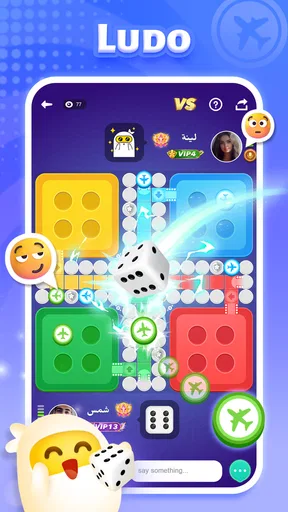
In a realistic household scenario, someone has a few minutes before dinner and wants to start Ludo, while another person would rather play Dominoes. Having several board and casual games in one place can save the small hassle of switching between separate apps or deciding which one everyone should install. TopTop is free to download, and its broad mix makes it a reasonable option to try before committing to a dedicated game app.
That convenience works best when people agree on how the device and account will be used. A shared tablet can be passed around for turns, but a social app is not quite the same as a board sitting on the kitchen table: profiles and conversations may belong to whoever is signed in. I would decide in advance whether the app is for one person’s account or for a shared household session, rather than casually handing a device around and assuming every player has a separate identity.
Keep the account and the device in mind
The original setup feels straightforward, and customizing an avatar gives a player a visible identity in the app. That is useful when the same group returns to play, but it also makes account boundaries worth thinking about. If several relatives use one phone, I would avoid treating an avatar as proof that each person has a separate account. Before a family game, check who is signed in and who can see or use the active profile; this simple habit prevents confusion over whose activity is being represented.
For a group coordinating a game, a practical approach is to agree on the game first, then use the app’s available social options to bring people together. That is more dependable than opening the app without a plan and expecting everyone to choose the same activity. If the group includes people who do not want voice chat, decide whether text is enough before starting. The app’s chat can make a match feel sociable, but conversation is optional in spirit even when it is part of the experience: nobody should feel obliged to speak just to take part.
Age context matters more than the board-game label
The game is rated for Everyone, which makes it broadly accessible as a game, but the presence of chat is still relevant when deciding whether it suits a child or a mixed-age household. A family can enjoy the familiar board-game feel while remembering that social interaction is different from playing a physical board game at home. I would set expectations with younger players about who they are playing with and what they should share, and I would keep an adult nearby if the social side is not appropriate for independent use.
That is not a reason to avoid the app altogether. It is a reason to choose the context deliberately. For a family sitting together around one device, familiar games can give everyone a common activity; for a child using a device alone, the chat element deserves more attention than the game category alone might suggest. The age rating is a useful starting point, not a substitute for household rules about accounts and online conversation.
Worth Reading Before You Choose

EA SPORTS FC Mobile 26 Is a Bigger Football Game, but It Takes Time

Flipboard Shows What News Apps Must Do Beyond the Feed

Switching to Android Auto Means Rethinking Your Driving Routine

Google Calendar Makes a Crowded Week Easier to Manage

Ludo King Makes the Most of the Minutes Between Plans

Baby Panda World Brings Quick Play to Modern Phones, but Its Game Library Feels Busy
Where it fits among board-game apps
Compared with a dedicated Ludo or Dominoes app, TopTop’s appeal is breadth: you can move between different kinds of casual games and keep the social layer nearby. That variety helps when a group cannot agree on one title, or when a familiar game has run its course. The trade-off is that someone who wants only a polished, focused version of one board game may prefer a specialist app with fewer distractions and a simpler purpose.
It also differs from a physical board game in a useful but limited way. People who are apart can still share a game and conversation, while a local group can use the app when they do not have a board or pieces to hand. But a phone cannot reproduce the easy turn-taking and shared attention of sitting around a real board, and some players will prefer that face-to-face rhythm. I see TopTop as a handy extra for informal play, not a replacement for every kind of game night.
Small choices that make sessions smoother
One useful habit is to choose a short game when the group is still gathering, then settle into a longer session only after everyone is ready. That uses the app’s quick-match and longer-play flexibility without making late arrivals feel that they have interrupted a serious match. It is also worth agreeing on whether the goal is relaxed company or competition; the same game can feel very different depending on whether players are chatting casually or concentrating on winning.
Another trade-off is the difference between playing with people you know and joining strangers. Playing with friends gives the chat a familiar context, while open play can be a way to find opponents when nobody is available. I would choose between those options based on the mood and the ages of the players, not just on which button gets a match started fastest. If a household wants a purely private, offline-style experience, a physical game or a single-player title will be a better fit.
TopTop is developed by Social Game Lab and sits in the board-game corner of mobile gaming, although its selection reaches beyond one traditional board. It first appeared on July 7, 2019, and version 3.17.0 is listed for Android devices running Android 6.0 or later. Its average rating is 3.5 from around 138,000 ratings, with over 10 million installs. Those figures suggest that it has found a substantial audience, while the rating is a reminder that its broad social approach will not suit every player equally.
What to expect before installing
The app is free to download, but it includes optional purchases priced from $0.49 to $499.99 per item. I would be especially careful with purchase settings on a shared device, where more than one person may have access to the same app environment. Agreeing that purchases need permission is a simple household boundary, particularly if children use the device. The existence of paid items does not mean a family needs to buy anything to try the basic idea, but the wide price range makes it sensible to check before approving a transaction.
For someone deciding whether to install it, the key question is not simply whether they like Ludo or Dominoes. It is whether they want several casual games connected to a social experience. If that sounds appealing, the mix gives friends and relatives a convenient way to pick a game without relying on one title. If they dislike in-game conversation, want a strictly private experience, or prefer one carefully focused board game, a dedicated alternative is likely to feel calmer.
My household verdict is that TopTop works best as an optional gathering place for casual play, with clear expectations about who is signed in, who is chatting, and whether purchases are allowed. Its variety and social tools can make it easy to get a game going, especially when people are not in the same room. The same features call for a little more thought than a traditional board game when a shared device or younger players are involved. I would try it for relaxed group sessions, but I would not make it the default choice for every age or every kind of game night.
What’s the Buzz About?
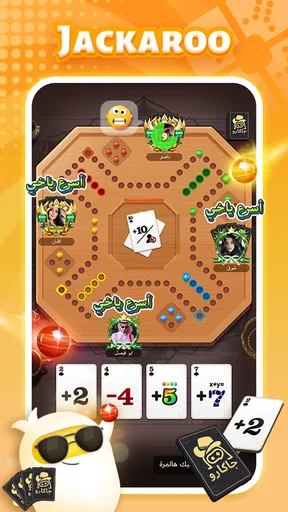
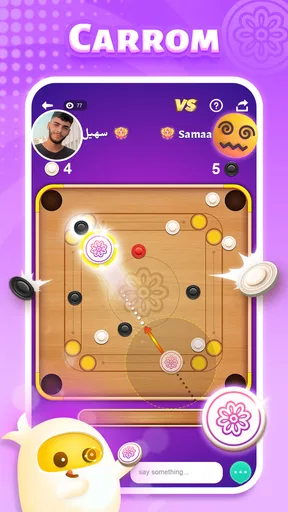
When I first launched TopTop: Games&Chat, I was immediately drawn in by its colorful and friendly interface. It's designed to make you feel welcome, almost like stepping into a cozy room full of board games and chatty friends. The app boasts a wide variety of games ranging from classics like Ludo and Dominoes to more unique offerings such as Sheep Fight. And the best part? You can play all these games while chatting with your friends or even making new ones.
Easy Peasy Setup
Setting up the app was a breeze, which I appreciated. Who has time for complicated sign-ups, right? After downloading the app, I simply logged in using my preferred method—Google or Facebook—and I was ready to roll. The app also prompted me to customize my avatar, adding a nice personal touch. A little character that feels like me in the digital world? Yes, please!
Game On!
The selection of games is nothing short of impressive. Whether you’re into strategy, luck-based games, or just want to pass the time, there’s something for everyone. I found myself particularly addicted to the game "Sheep Fight"—it’s quirky, fun, and surprisingly strategic. The app allows you to choose whether to play with friends or join games with strangers, which is great for when you’re feeling competitive or just want to meet new people.
Another cool feature is the variety of game modes. You can jump into a quick match if you’re short on time or dive into a more extended session if you’ve got a lazy afternoon ahead. It’s this flexibility that makes the app suitable for any occasion.
Chat While You Play
One of the standout features of TopTop is the ability to chat while you play. I found this feature particularly engaging because it adds a social element to gaming that often gets lost when you’re playing solo or with strangers. Whether you’re trash-talking during a game of UNO or strategizing in a team game, the chat function is smooth and unobtrusive.
The app also supports voice chat, which can make game nights feel more lively and immersive. It’s like having a game night with friends even if everyone is miles apart. Pretty neat, right?
Design and User Experience
The design of the app is clean and intuitive. I never found myself lost in menus or struggling to find features. The developers have done a great job of keeping things straightforward. The games load quickly and run smoothly, which is a big plus for anyone who hates lag or tech hiccups as much as I do.
In-App Purchases
While the app is free to download and play, there are in-app purchases available. These range from cosmetic items for your avatar to additional game features. While I didn’t feel the need to spend any money to enjoy the app, it’s nice to have those options if you want to enhance your experience.
For those concerned about spending, the app does a good job of not pushing these purchases too aggressively. It’s a relief to enjoy the app without feeling pressured to open your wallet at every turn.
Final Thoughts
Overall, TopTop: Games&Chat delivers on its promise of providing a fun and social gaming experience. Whether you're a casual gamer looking to unwind or someone who thrives on social interaction, this app offers a bit of both worlds. The variety of games, coupled with the seamless chat feature, makes it a standout choice in the sea of mobile gaming apps.
So, if you’re looking for a new app to spice up your game nights or just want to kill some time with a bit of friendly competition, give TopTop: Games&Chat a shot. You might just find your next favorite pastime!
Pros
- Diverse game selection for all ages.
- Seamless chat integration with games.
- Frequent updates with new content.
- User-friendly interface and navigation.
- Low data consumption for mobile users.
Cons
- In-app purchases can be pricey.
- Occasional connectivity issues.
- Limited parental controls available.
- Ads can be intrusive during gameplay.
- Some games require high specs.
FAQs for TopTop: Games&Chat
What is TopTop: Games&Chat and how does it work?
TopTop: Games&Chat is a social gaming platform that combines interactive games with a chat feature, allowing users to connect and play with friends or meet new people. Users can choose from a variety of games, join game rooms, and communicate in real-time through text or voice chat. The app offers a seamless blend of social interaction and entertainment.
Is TopTop: Games&Chat free to use?
Yes, TopTop: Games&Chat is free to download and use. However, the app may offer in-app purchases for additional features, game enhancements, or virtual goods. These purchases are optional and are designed to enhance the user experience. Make sure to check the app’s settings to manage in-app purchase options effectively.
What types of games can I play on TopTop: Games&Chat?
TopTop: Games&Chat offers a diverse range of games, including casual, strategy, and party games. Users can find popular titles and new, innovative games tailored for both single and multiplayer experiences. The app frequently updates its game library, ensuring there’s always something new and exciting to try.
How secure is my data on TopTop: Games&Chat?
TopTop: Games&Chat prioritizes user privacy and data security. The app employs encryption and other security measures to protect user data during transmission and storage. Users should review the app’s privacy policy and settings to understand how their information is handled and what options they have for managing their privacy.
Can I play TopTop: Games&Chat with friends who use different devices?
Yes, TopTop: Games&Chat supports cross-platform play, allowing users to connect with friends regardless of whether they are using Android or iOS devices. This feature enhances the app’s social experience, making it easy for users to engage with friends and family across different platforms.


